
Learning bite
Architecture and kind
Follow a desired-state change from the API to a local container.
On this page
Start with a system you can explain
In Compose, you described containers and started them on one engine. Kubernetes adds a shared API and controllers that keep checking what should be running across nodes. A node is a machine available to the cluster. A Pod is the unit Kubernetes places on a node: one or more containers that share networking and can share volumes. The first example will use one container per Pod.
Suppose you ask for two copies of a web application. You do not script “find a machine, start a container, and retry tomorrow.” You store the desired count in a Kubernetes object. A controller repeatedly compares that request with what exists and tries to close the difference. This repeated checking and repair is called reconciliation. It can replace a lost Pod, but cannot repair an application bug or reconstruct lost database records.
The control plane maintains this shared view and makes placement decisions. Node software performs the work:
| Component | Its part in the two-copy example | Useful failure clue |
|---|---|---|
| API server | Receives authenticated requests, checks permission and admission rules, and exposes objects | A rejected request has not created the desired workload |
| etcd | Stores the cluster's API data through the API server | Cluster configuration needs its own recovery plan; this is not the Ledger database |
| Controller manager | Runs controllers; a Deployment creates a ReplicaSet, which maintains its requested Pods | Desired replicas can exist before any container starts |
| Scheduler | Chooses a suitable node for each unassigned Pod | An impossible resource or placement request can leave it unscheduled |
| kubelet | Node agent that asks a container runtime to start assigned containers and reports status | An assigned Pod can still fail to pull its image or start |
| Container runtime | Fetches images and runs containers, using the interface the kubelet expects | Docker-built images remain usable; Docker Engine need not be the node runtime |
| Service network implementation | Connects a Service address to selected Pod endpoints, often using kube-proxy | A running container does not prove Service routing works |
These components communicate asynchronously. kubectl apply returning successfully means the API accepted a change; it does not mean every later step succeeded. On a one-node kind cluster, control-plane components and learning workloads share the local resources. Their responsibilities remain distinct even though there is only one node.
kind runs Kubernetes nodes as containers. On a Mac those containers run inside the container engine's Linux environment. Use it to practise APIs, controllers, and packaging, while remembering that it cannot reproduce every VM, cloud network, or storage failure.
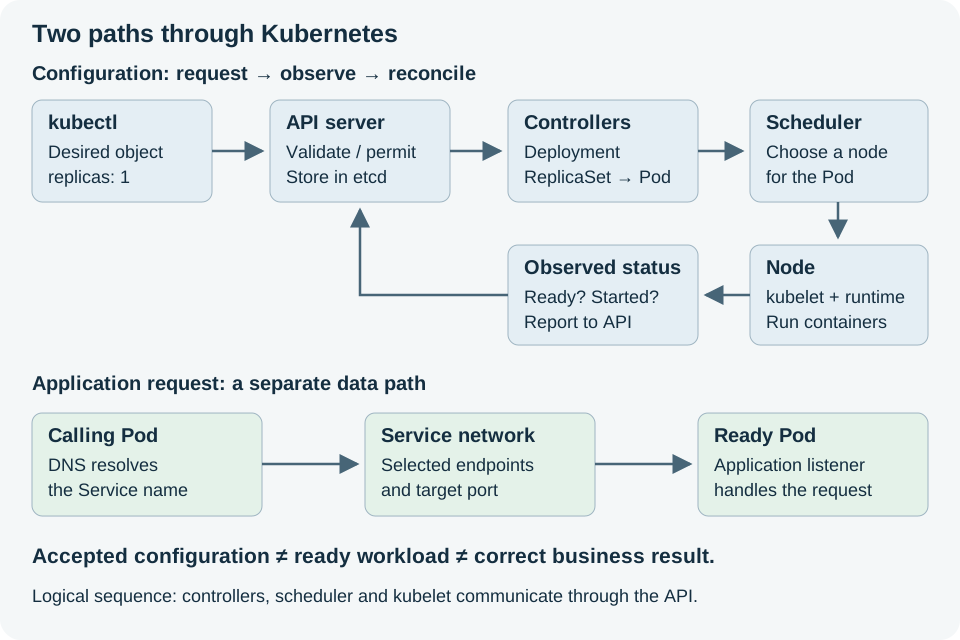
Read the two paths separately. The upper arrows show a logical sequence: controllers, scheduler, and kubelet communicate through the API. Application requests do not travel through etcd. The request path can fail even when the configuration request was accepted.
Read an object before creating one
A Kubernetes object is a record with a type and a name. YAML and JSON are two ways to describe it. A manifest normally supplies apiVersion, kind, metadata, and the requested fields in spec. metadata includes the name, namespace, labels, and annotations. Labels are short keys used to select related objects; annotations hold descriptive information. A namespace groups namespaced objects, so study-web in one namespace is different from study-web in another. It is not automatically a network security barrier.
For a Deployment, spec.replicas: 2 asks for two Pods. The controller writes observations such as status.readyReplicas: 1. Do not edit status to make the display green: determine why only one Pod is ready. The manifest's Pod template describes future Pods; replacing that template can trigger a rollout.
kubectl is a client for the API. Its kubeconfig selects a cluster, credentials, and a default namespace through a context. In kubectl --context kind-microbank-advanced -n classroom get pods, the context chooses this disposable cluster, -n chooses the namespace, get requests a summary, and pods names the resource type. describe adds conditions and events; logs reads container output; explain describes API fields. None requires memorizing the whole API.
Prepare one disposable local cluster
Finish the DevOps Foundations transaction check, the opening MicroBank design review, and the PostgreSQL/MicroBank database handoff first. Bring the diagram, inspected schema constraints, fixture restore evidence, failure questions, and actual transaction evidence into this deployment exercise. Stop the separate PostgreSQL fixture before resuming the MicroBank profile. Then stop the MicroBank Compose services before starting this track. Keep their volumes if you want to return to them. Build application images before starting extra controllers.
Select a kind release and its documented node image together. Record the image digest, host architecture, container-engine allocation, and free disk space. Do not reuse another project's cluster. In the MicroBank checkout:
mkdir -p .local evidence infra/study/k8s
# Set this to an image listed in your installed kind release notes.
: "${KIND_NODE_IMAGE:?Set the reviewed kind node image including its digest}"
kind create cluster --name microbank-advanced \
  --image "$KIND_NODE_IMAGE" --kubeconfig "$PWD/.local/kubeconfig" --wait 5m
export KUBECONFIG="$PWD/.local/kubeconfig"
kubectl config current-context
kubectl --context kind-microbank-advanced get nodes -o wide
kubectl --context kind-microbank-advanced get pods -n kube-system
Ignore .local/ and private evidence in Git. All later kubectl examples use the explicit kind-microbank-advanced context. Never substitute an EKS/GKE context for the local test track.
Inspect before deploying an application
After cluster creation, run these read-only commands in the same terminal:
kubectl --context kind-microbank-advanced cluster-info
kubectl --context kind-microbank-advanced get namespaces
kubectl --context kind-microbank-advanced get nodes -o yaml
kubectl --context kind-microbank-advanced explain deployment.spec.replicas
In the node YAML, find its name under metadata and its conditions under status. Find the Ready condition and read its message if it is not true. In kube-system, identify the API server, scheduler, controller manager, etcd, DNS, and networking Pods that your selected kind release creates. Names and counts can vary by release. A missing DNS service and an unreachable API are different failures; the first does not imply the second.
Try the reasoning first: if the API contains a Pod with no node assignment, which component should you investigate? Start with scheduler events and the Pod's constraints. If it has a node but reports an image pull error, investigate the image/runtime path on that node. This is why the component map is useful: it narrows the next observation.
Readiness check
Explain the difference between a node container, a Pod, and an application container. Record whether the node is Ready and why any system Pod is Pending. With 16 GB host RAM, start with one kind node; measure host memory pressure and engine usage before adding anything. Allocating the host's entire memory to its engine leaves no room for macOS or builds.
Readiness answer: the kind node container provides the node environment; a Pod is a Kubernetes workload unit inside it; the application container is a process environment within that Pod. All still depend on your Mac and local engine. Continue to Deployments, Services, and configuration for a tiny web page before deploying MicroBank.
Kubernetes object fields↗ and kubectl overview↗ explain the inspection tools used here.
Sources
kind quick start↗ and release-specific node images↗. Kubernetes components↗.
Your notes and evidence
Record observations, questions, or links to your work. Keep credentials out of your notes.
Back up or restore this path
Progress and notes stay in this browser. A backup contains only this learning path.