
Learning bite
PostgreSQL diagnosis and maintenance
Use activity, waits, table statistics, and storage observations to form a testable diagnosis.
On this page
Begin at the failing operation
Capture the failing request's time, service, database target, and error. Separate failure to acquire a connection from a statement waiting or running slowly. Low CPU does not exclude blocked transactions, slow storage, network delay, or pool exhaustion.
Inspect the local fixture using a monitoring session:
SELECT pid, application_name, state,
       now() - xact_start AS transaction_age,
       wait_event_type, wait_event,
       pg_blocking_pids(pid) AS blocking_pids
FROM pg_stat_activity
WHERE datname = current_database()
  AND pid <> pg_backend_pid()
ORDER BY xact_start NULLS LAST;

SELECT relname, n_live_tup, n_dead_tup, last_autovacuum, last_autoanalyze
FROM pg_stat_user_tables
WHERE schemaname = 'study'
ORDER BY relname;

SELECT pg_size_pretty(pg_database_size(current_database())) AS database_size;
The fixture administrator sees more than an ordinary runtime role. Statistics can lag and some row counts are estimates; a null autovacuum timestamp on a new tiny table is not proof that maintenance is broken. Sample outside a long-running monitoring transaction. Statistics views↗, database size functions↗.
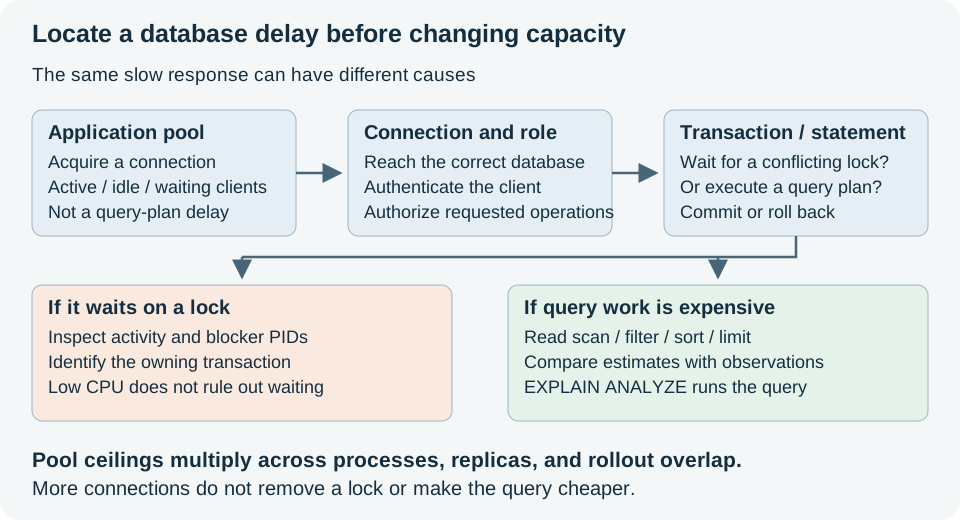
Use the diagram to choose a first observation. A pool wait occurs before the statement gets a database connection; a lock wait can occur after connection and authentication already succeeded. Do not treat both as a reason to raise every connection limit.
Understand maintenance before changing it
Updates and deletes leave row versions that may later be reclaimed. Vacuum makes eligible space reusable and helps prevent transaction-ID wraparound; analyze refreshes planner statistics. Long transactions can keep old row versions in use, preventing vacuum from reclaiming them. Ordinary vacuum generally does not return all freed space to the OS. VACUUM FULL rewrites a table and takes a strong lock, so it is not a routine first response to a disk alert. Routine vacuuming↗.
Run this only against the fixture, outside a transaction:
VACUUM (ANALYZE) study.entries;
A successful command does not establish that autovacuum is correctly tuned for a real workload. Inspect trends, transaction ages, table churn, and maintenance progress before tuning.
Connect evidence to an action
| Observation | Next useful check |
|---|---|
| Waiting on a lock | Identify blocker and owning operation; review transaction lifetime before cancelling anything |
| Growing pool wait time | Compare pool ceiling with active queries and leaks; adding API replicas may worsen it |
| Query consumes time without lock waits | Examine plan, row estimates, buffers, storage, and client/server network |
| Storage fills | Separate table/index growth, WAL retention, logs, and backups; never delete live database files manually |
| Errors but normal process-health checks | Verify the actual write/read journey and its data contract |
For recurring query analysis, pg_stat_statements can help. Review its configuration and restart requirements before enabling it. This exercise does not assume it is already enabled. SQL logs and recorded queries may contain sensitive values; collect only what the investigation needs. pg_stat_statements↗.
Checkpoint
Use the two-session lock exercise to explain a wait using observed PIDs, not a CPU guess. Record one signal for each of connection pressure, transaction age, slow queries, storage growth, and user-visible correctness. Decide which signals warrant an alert and which are useful during an investigation.
Work through a diagnosis without guessing
For an invented snapshot, study-lock-waiter has a Lock wait and its blocker list names the PID of study-lock-holder, whose transaction is open. The next useful question is what that holder is doing and why its transaction remains open. Adding CPU or rebuilding an index does not release that row lock. Use the earlier bounded lock exercise to observe actual PIDs; do not reuse the invented example as a run result.
A new tiny table can have no recorded autovacuum yet without a fault. Rising dead-row estimates over time, long transactions, and table churn provide more context than one timestamp. Keep this patient diagnostic approach for migrations: the next bite explains why a small schema change can still need a lock window.
Your notes and evidence
Record observations, questions, or links to your work. Keep credentials out of your notes.
Back up or restore this path
Progress and notes stay in this browser. A backup contains only this learning path.