
Learning bite
Containers, runtimes, and the first lifecycle
Understand why containers exist, how Docker runs a process, and how to inspect and remove it.
On this page
An application needs more than its source
A Python service needs an interpreter, libraries, configuration, files, and access to its dependencies. Installing different applications directly on one machine can create conflicting versions and undocumented assumptions. Containers package a userspace environment and run processes with isolation, making many of those dependencies explicit and repeatable.
An image is a packaged filesystem and execution metadata. A container is an instance created from an image, with runtime settings and its own writable layer. An image can exist without a running container, and several containers can use the same image. Stopping a container does not delete the image.
A virtual machine includes its own guest kernel. Linux containers share the kernel of the Linux host on which they run. Linux namespaces give processes separate views of things such as process IDs, mounts, and networking; control groups account for and limit resource use. Neither means unlimited security or capacity. Containers still depend on the host kernel, compatible architecture, configuration, and reachable services.
Locate the engine before using it
Docker's CLI sends requests to an engine. A typical Docker Engine stack uses containerd and an OCI-compatible runtime such as runc to create and manage container processes. OCI specifications help define image and runtime formats; Docker is a developer-facing tool around those pieces.
On a Mac, Linux containers run inside a Linux environment supplied by a tool such as OrbStack or Docker Desktop. They do not run directly on the macOS kernel. Use the OrbStack installation from System engineer foundations, or follow your selected engine's official installation instructions. Avoid starting several container engines at once while learning.
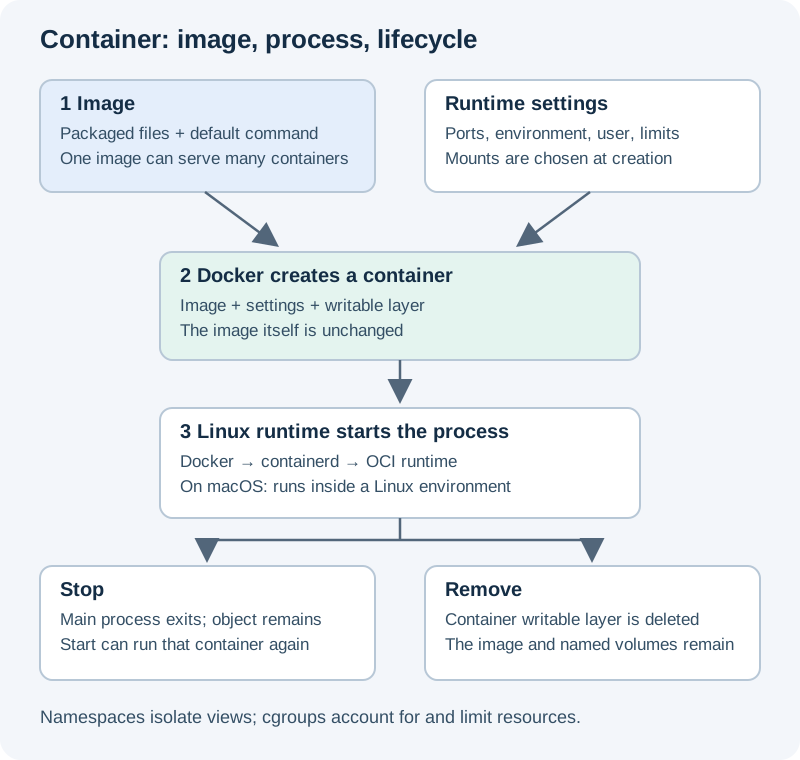
Read the diagram as three distinct decisions: (1) choose an image; (2) create and start an isolated process with runtime settings; (3) stop or remove that container. Persistent volumes have a separate lifetime. Open the diagram.
From your Mac terminal:
docker context show
docker version
docker info --format '{{.OSType}} / {{.Architecture}}'
Confirm the context is your intended local engine. docker version should show both client and server information; a client version alone does not prove the engine is reachable. The OS should describe the Linux engine, while the architecture reflects that runtime. Stop here if the context points somewhere unexpected.
Observe a process that finishes
Run this small fixture. It may download the public Python image:
docker run --name sk-lifecycle python:3.12-slim python -c 'print("container process ran")'
docker ps -a --filter name=sk-lifecycle
docker logs sk-lifecycle
docker inspect sk-lifecycle --format '{{.State.Status}} / {{.State.ExitCode}}'
docker start -a sk-lifecycle
docker rm sk-lifecycle
Expected: the message prints, the container is exited with exit code 0, and starting the existing container prints the same message again. Removal deletes that container's writable layer; the base image remains available. A process completing successfully is normal, not a crash. A container stays running only while its main process does.
For a long-running service, docker logs reads the process's captured output, docker exec starts another process inside a running container, and docker stop requests shutdown before forcing termination after a timeout. exec does not restart an exited container. Inspect a failure's exit code and logs before deleting the object that holds that evidence.
Checkpoint
If you remove one container, are other containers created from that image removed? No. If a container uses localhost, is that automatically your Mac? No; networking gets its own lesson. If a 16 GB host runs many containers, does each get 16 GB guaranteed? No; they contend for the engine's allocated resources unless limits constrain them.
Next, write a Dockerfile for a tiny status server. Keep the Python base image for that exercise; avoid broad prune commands that could remove other projects' data.
References: container basics↗, Docker architecture↗, container run↗, and OrbStack Docker↗.
Your notes and evidence
Record observations, questions, or links to your work. Keep credentials out of your notes.
Back up or restore this path
Progress and notes stay in this browser. A backup contains only this learning path.