
Learning bite
Terraform and your first local workflow
Read configuration, plan a local change, apply it, and explain what state records.
On this page
Describe a result you want to keep
Manually creating a resource works once, but repeating the process means remembering choices and checking what already exists. Infrastructure as code stores those choices in versioned files. Terraform reads a description of desired resources, checks what it knows about existing ones, and proposes actions to bring them into agreement. This is called a declarative approach: describe the result, rather than a shell script's sequence of commands.
Configuration is the desired description. State records Terraform's relationship with managed objects. A provider understands how to read or change a particular kind of object, often through an API. A plan is a proposed change; applying attempts that change. Those are separate steps, so you can inspect the proposal first.
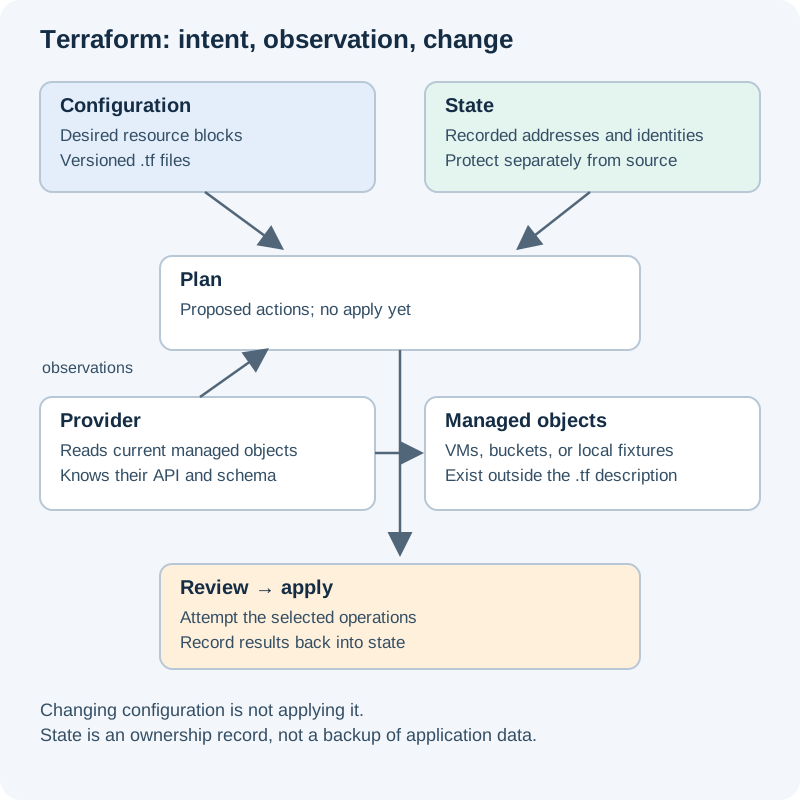
Read the diagram in three passes: (1) files describe intent; (2) state and provider observations help calculate a plan; (3) apply performs reviewed changes and records the result. Editing a file alone changes neither the remote system nor the saved state. Open the diagram.
Install and start without a cloud account
Follow HashiCorp's installation instructions↗ for your operating system, then run terraform version. Use Terraform 1.12.x for consistency with the Associate 004 study baseline, or a compatible 1.x version satisfying this example. The built-in terraform_data resource records a value in Terraform state. It creates no VM, bucket, or file containing application data and needs no cloud credentials.
In a new empty directory called terraform-basics, save main.tf:
terraform {
  required_version = ">= 1.12, < 2.0"
}

resource "terraform_data" "name" {
  input = "local-foundations"
}

output "name" {
  value = terraform_data.name.output
}
A block has a type, labels, and arguments inside braces. Here resource is the block type, terraform_data is the resource type, name is our local label, and input is an argument. The address terraform_data.name identifies this resource in the configuration. It is not a filename or a cloud name. The output block exposes a value to the person or program using this root directory.
Run from terraform-basics:
terraform fmt
terraform init
terraform validate
terraform plan -out=first.tfplan
terraform show first.tfplan
fmt normalizes layout. init prepares this working directory. validate checks the configuration's internal consistency. The plan should propose one addition. Its generated ID and output may be shown as known only after apply. Review the resource type: it must be this built-in fixture, with no provisioner or cloud resource.
Apply, observe, and stop
After that review, run:
terraform apply first.tfplan
terraform output -raw name
terraform state list
terraform plan
Applying a saved plan proceeds without the usual approval question. Expected observations are the value local-foundations, the address terraform_data.name, and then a no-change plan. Actual formatting and generated IDs vary. Terraform keeps local state in this directory; do not commit state, its backups, .terraform/, or saved plan files. Provider lock files are different and normally belong in version control when present.
Keep this directory for the next lessons. If stopping here permanently, run terraform plan -destroy -out=cleanup.tfplan, inspect the one removal, then apply cleanup.tfplan. Deleting state would merely erase Terraform's records; it is not the cleanup workflow.
Explain the result
Why did the second plan propose no changes? The desired input agrees with recorded state for this local resource. Does that prove cloud access or a working application? No; neither was involved. Next, add another resource and learn how references establish ordering.
References: Terraform workflow↗, configuration syntax↗, and terraform_data↗.
Your notes and evidence
Record observations, questions, or links to your work. Keep credentials out of your notes.
Back up or restore this path
Progress and notes stay in this browser. A backup contains only this learning path.