
Learning bite
Kustomize bases and overlays
Separate reusable workload intent from environment choices and preserve the latest fixes.
On this page
Base and overlay, with one tiny example
Kustomize combines Kubernetes YAML without introducing a separate template language. A base holds shared objects. An overlay points to the base and describes the differences for one target. Rendering means producing the final YAML; applying means sending it to a cluster. Learn to inspect the first before doing the second.
One reviewed source for each workload
The Advanced DevOps examples introduced an initial Kubernetes manifest, a copied GitOps base, and a temporary Rollouts exercise. Those snapshots can diverge. Before creating the platform base, compare them with the last working deployment and preserve any security or resource changes. Choose one authoritative source for the new track and make future changes there.
The platform lab uses a base for Accounts and Ledger Deployments and Services. Local, dev, QA, preprod, and production overlays express deliberate differences. Only the local overlay is initially runnable. Render and review the other four overlays without deploying them until their dependencies and access controls exist.
What belongs where
| Base | Overlay or external dependency |
|---|---|
| Container ports and dependency references | Environment annotation and namespace |
| Tested probes and security settings | Approved image identity and resource sizing |
| Stable Service selectors | Target-specific storage, identity, and ingress |
Keep selectors stable. Adding a label to the Pod template for ownership should not accidentally modify immutable Deployment selectors. Kustomize labels can add Pod-template labels with includeTemplates: true while leaving includeSelectors: false.
Render locally before using MicroBank
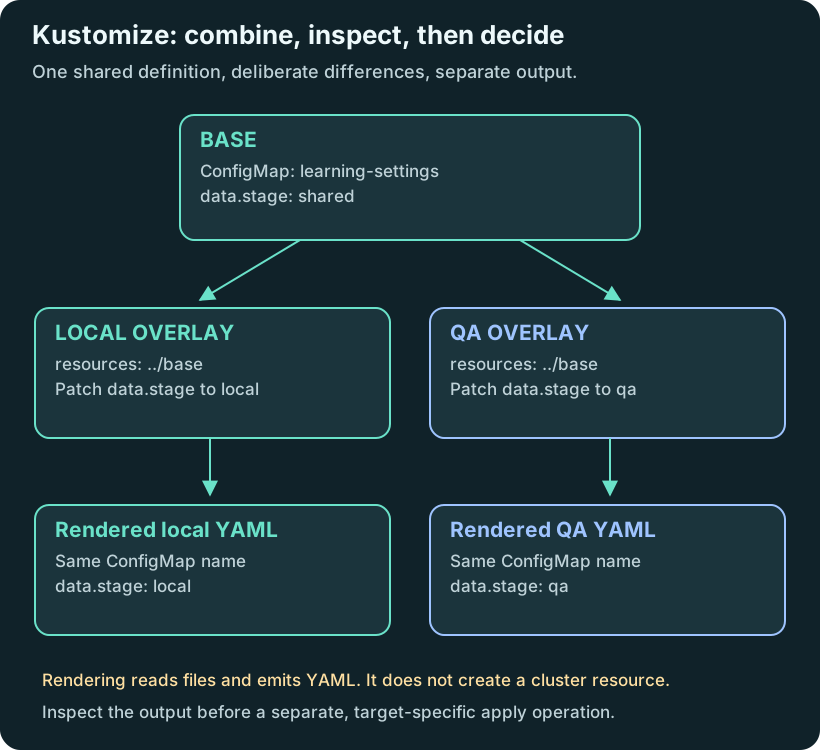
On your host, with kubectl installed, create a new scratch directory named overlay-practice with these files. No cluster or credentials are needed. This small ConfigMap is a teaching fixture, not MicroBank configuration.
base/kustomization.yaml:
resources:
  - settings.yaml
base/settings.yaml:
apiVersion: v1
kind: ConfigMap
metadata:
  name: learning-settings
data:
  stage: shared
local/kustomization.yaml:
resources:
  - ../base
patches:
  - target:
      kind: ConfigMap
      name: learning-settings
    patch: |-
      - op: replace
        path: /data/stage
        value: local
Create base/ and local/ inside the new directory before saving those files. From overlay-practice, run kubectl kustomize local. Expect one ConfigMap named learning-settings with data.stage: local. The base file still says shared: rendering did not edit it. Change the overlay value to qa and predict the only changed field before rendering again. Remove the scratch directory when finished; nothing was deployed.
The MicroBank lab applies the same idea to Deployments and Services, with additional labels, image references and Secret dependencies. Those dependencies make its rendered YAML more demanding to review, but do not change what an overlay does.
Try it
Inspect the last verified GitOps base and the canary cleanup record. If Ledger remains a Rollout, complete the documented recovery to a Deployment before using this path's baseline. Do not let two controllers manage equivalent Ledger Pods.
Render the overlay before applying it:
kubectl kustomize platform/workloads/overlays/local
This command becomes available after the environment lab creates that directory. Explain every difference from the base. Changing a namespace without also provisioning its Secret, databases, queues, and access is not a complete new environment.
Checkpoint and revision
Show where the next hardening change belongs and which overlays inherit it. A rendered manifest is a review artifact; it is not evidence that the target environment exists.
Compare your reasoning
An overlay can change a value in rendered YAML. It cannot create missing cloud credentials or implement a new messaging protocol in the application. Also, a directory called production is not proof of environment isolation. The environment lab is the next step after this render-only example.
Sources
Your notes and evidence
Record observations, questions, or links to your work. Keep credentials out of your notes.
Back up or restore this path
Progress and notes stay in this browser. A backup contains only this learning path.