
Learning bite
DNS resolution
Compare name-service resolution with direct DNS queries.
On this page
A hostname is a question, not a permanent address
DNS stores records associated with names. A recursive resolver answers a client's question using cache or by querying other servers. An authoritative server serves records for a zone it is responsible for. These roles differ: your laptop normally asks a resolver, not every server in the hierarchy.
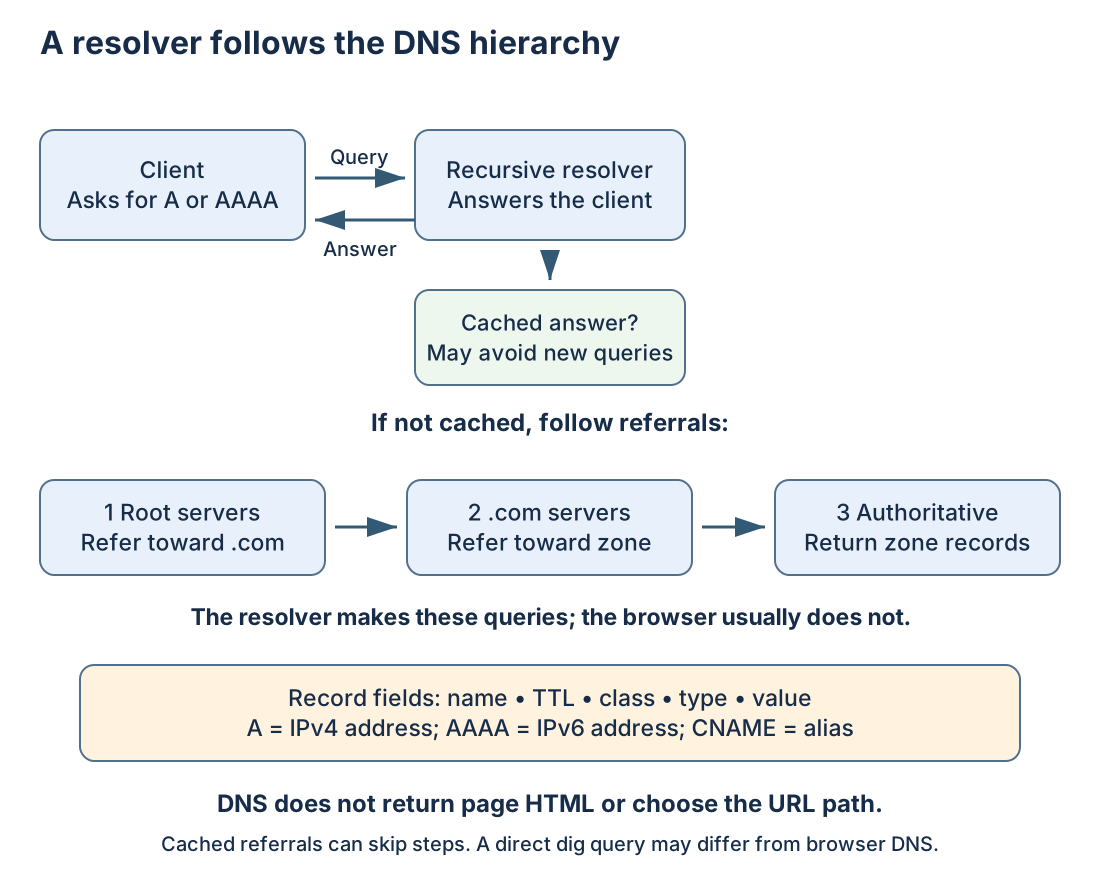
Read the diagram as an uncached example. Root servers refer the resolver toward a top-level domain such as .com; those servers identify authoritative servers for the next delegation. The authoritative answer is returned through the resolver to the client. Cached answers or referrals can skip parts of the walk. A browser using secure DNS may choose a different resolver from a command-line program.
| Record | Carries | Example purpose |
|---|---|---|
A / AAAA | IPv4 / IPv6 address | Locate an endpoint for a name |
CNAME | Alias to another name | Follow a canonical name before obtaining its address |
NS | Authoritative nameserver names | Describe delegation/zone authority |
MX | Mail exchanger and preference | Direct mail delivery |
TXT | Text values | Publish verification or policy data |
An address record does not return HTML, decide the /blog path, or identify every origin behind a proxy. A CNAME is not an HTTP redirect: it changes DNS lookup, whereas a redirect tells an HTTP client to navigate to another URL.
Query a known public name
Inside the Linux machine, use dig from the distribution's DNS utilities if installed; command -v dig checks availability. Follow the package lesson's review process if installing it. Run:
getent ahosts example.com
dig example.com A
dig example.com AAAA
getent uses the system's configured name-service order, which may include /etc/hosts. dig sends a DNS query directly. Applications with their own resolvers may differ from both. With systemd-resolved installed, resolvectl status explains its per-interface settings; that command's absence is not evidence of DNS failure.
An illustrative answer is:
;; ->>HEADER<<- opcode: QUERY, status: NOERROR, id: 1234
;; ANSWER SECTION:
www.example.test.  120  IN  A  192.0.2.20
This uses documentation-only names/addresses and is not a live target. The answer fields mean owner name, remaining cache lifetime (TTL) in seconds, Internet class (IN), record type (A), and address. The trailing dot marks an absolute DNS name. In your real output, also read the SERVER line to see the queried resolver. Do not memorize the actual example.com addresses.
Caching explains some differences
A resolver can reuse an answer while its TTL permits. Changing an authoritative record does not erase copies already cached elsewhere. If planning a change, lowering TTL only helps once earlier longer-lived copies have expired; then allow time for the new value to spread according to caches. Negative answers can also be cached.
Private zones, per-network DNS, search suffixes, and VPN configuration can give different clients different results. Test from the same context as the failing application. A public resolver cannot be assumed to know your internal names, and publishing an internal name to a public DNS query is not always appropriate.
Distinguish the failure before repairing it
| Response | Reasoning |
|---|---|
NXDOMAIN | This response says the queried name does not exist |
NOERROR, no requested-type answer | Name may exist without that record type; inspect the rest of the response |
SERVFAIL | Resolver could not complete a valid answer; investigate delegation, upstreams, or validation |
| Timeout | No timely DNS reply; check reachability and the chosen resolver |
For practice, record the exact query type, resolver, status, answers, and TTL from your three commands. If A exists but AAAA does not, can the site still work over IPv4? Yes. If getent resolves a local hosts-file name while dig does not, is that necessarily a defect? No: they queried different name-service paths. Do not permanently hard-code a transient IP as the general repair. Next, ask what happens after lookup succeeds.
Sources
Primary references: BIND dig reference↗; getent↗.
Your notes and evidence
Record observations, questions, or links to your work. Keep credentials out of your notes.
Back up or restore this path
Progress and notes stay in this browser. A backup contains only this learning path.