
Learning bite
Read permissions before changing them
Connect an access request to owner, group, other, and directory search permissions.
On this page
Read one listing all the way through
Linux checks access using the requesting process's user and group IDs, the file's owner and group, and its permission mode. Work as your regular user in the Ubuntu machine. Create fresh files so no later lab setup is required:
study_permissions=$(mktemp -d)
cd "$study_permissions"
mkdir config
printf 'theme=plain\n' > config/settings.txt
chmod 750 config
chmod 640 config/settings.txt
ls -ld config
ls -l config/settings.txt
id
Here is an illustrative listing, with an example username and date:
-rw-r----- 1 learner web 12 Oct 1 10:00 settings.txt
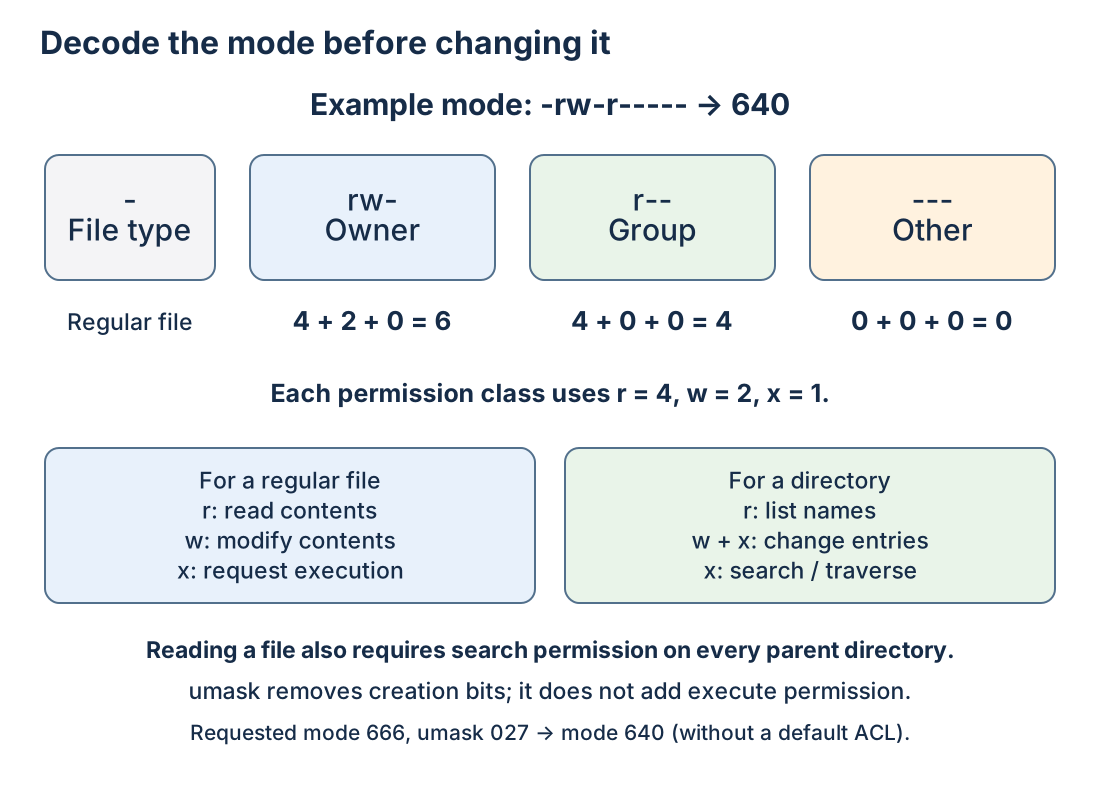
Read the image and listing together: only the first character describes the file type; the next nine characters form three permission classes. Numeric digits summarize one class each.
Read it from left to right: regular file (-); owner permissions rw-; group permissions r--; other permissions ---; one hard link; owner learner; group web; size in bytes; modification time; name. The real owner/group/date come from your machine. ls -l may show an extra marker such as + when additional access rules exist.
For ordinary mode checks, an owner uses the owner class; otherwise a process belonging to the file's group uses the group class; otherwise it uses other. Permissions are not the union of all three. An owner with no owner-read bit does not fall through to a more generous other-read bit. ACLs and privileged processes add rules beyond this basic example.
File and directory permissions answer different questions
| Bit | Regular file | Directory |
|---|---|---|
r | Read contents | List entry names |
w | Modify contents | Create/remove/rename entries, normally with x too |
x | Request execution as a program | Search: resolve a named entry and pass through the directory |
Every parent directory in the path needs suitable search permission. A file's own write bit does not alone decide whether someone can delete its name; that is primarily an operation on the containing directory. Conversely, directory read permission alone does not let you open every file inside it.
The sticky bit, seen as t in a directory such as /tmp, restricts deletion/renaming even when many users can write there: normally the file owner, directory owner, or a suitably privileged process may remove an entry. Setgid on a directory can make new entries inherit its group. Setuid on an executable changes execution credentials; it is not a convenient repair for ordinary access problems.
Translate symbolic and numeric modes
Each class uses three values: read 4, write 2, execute/search 1. Add the desired bits within each class. 640 means owner 4+2, group 4, other 0; 750 means owner 4+2+1, group 4+1, other 0. The three digits do not represent three users.
chmod u+x config
chmod go-rwx config/settings.txt
ls -ld config
ls -l config/settings.txt
The first command adds owner search permission (already present here), leaving other bits alone. The second removes group/other permissions from this one file. chmod 600 config/settings.txt would specify the whole ordinary mode. Recursive 777 changes are unnecessary and make the intended access harder to explain.
Understand defaults with umask
umask removes permission bits from the mode a program requests when creating a file. Programs commonly request 666 for data files and 777 for directories. With mask 027, ordinary results are 640 and 750. This is a bit mask, not general decimal or octal subtraction; it cannot add execute bits to a file created without them.
Use a subshell, the parentheses below, so this experiment does not change your terminal's default afterward:
(
  umask 027
  touch masked.txt
  mkdir masked-dir
  ls -ld masked.txt masked-dir
)
umask
In this fresh ordinary directory, expect file rw-r----- and directory rwxr-x---. A default ACL or different program-requested mode can change the result. Existing files are not retroactively changed by umask.
Check yourself: why does a 640 configuration file not become executable under umask 000? The program did not request execute permission, and a mask only removes bits. Why can reading a 644 file still fail? A parent directory may lack search permission for the reader. Diagnose that next.
rm -- config/settings.txt masked.txt
rmdir config masked-dir
cd ~
rmdir "$study_permissions"
Sources
Technical references: GNU permission mode structure↗ and setting permissions↗.
Your notes and evidence
Record observations, questions, or links to your work. Keep credentials out of your notes.
Back up or restore this path
Progress and notes stay in this browser. A backup contains only this learning path.