
Learning bite
What happens when you type learnwithsk.dev in Google Search?
Follow the search request and the website request through DNS, connections, HTTPS, and browser rendering.
On this page
Start with two different requests
Open Google's search page, type learnwithsk.dev in its search box, and submit. You are asking Google to find results. Clicking a result then asks the destination website for a page. Entering a domain in the browser's address bar may take you directly to the site; the browser decides whether to navigate or search. Entering https://learnwithsk.dev/ explicitly requests that URL.
Google serves results from its search index and ranking systems. Crawling and indexing usually happened separately; it does not need to retrieve every candidate website live for each search. A page appearing, its position, and its snippet are not guaranteed. Google's account of crawling, indexing, and serving↗.
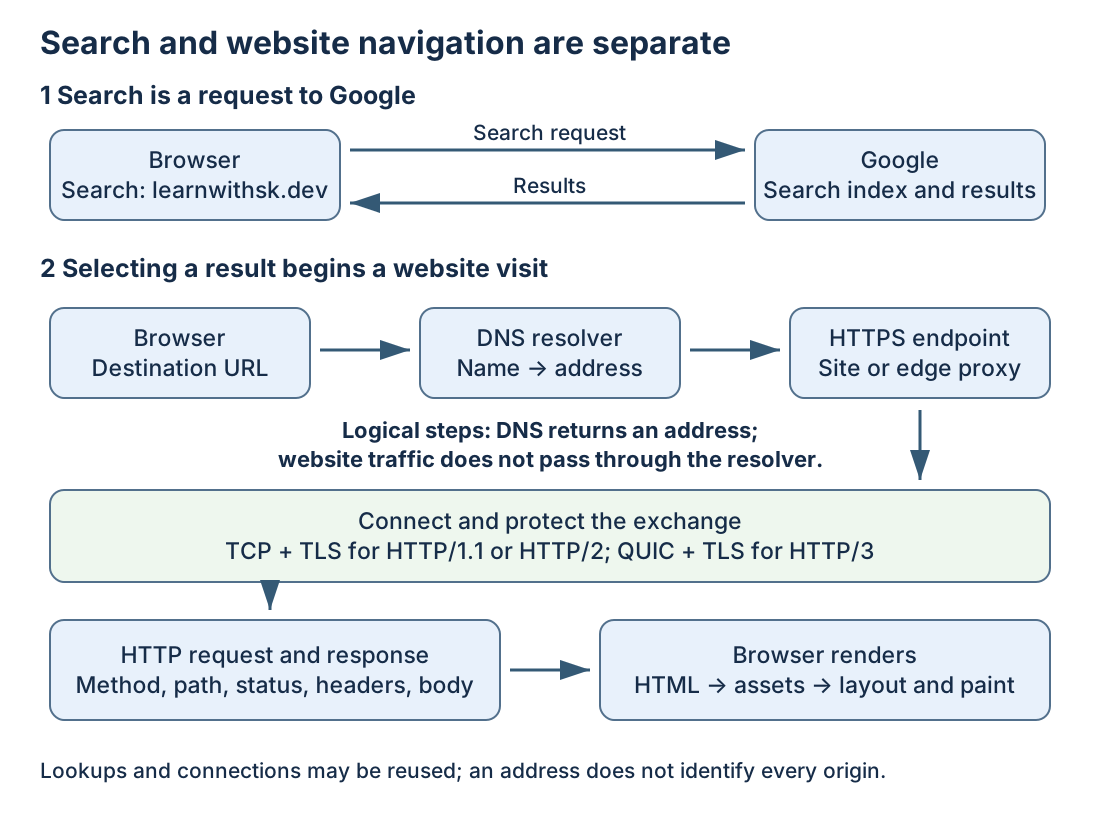
Read the top row as the search interaction and the lower flow as the subsequent website visit. Follow the arrows once for each destination; Google is not a compulsory proxy through which every later page request passes. The browser can reuse cached answers, connections, and resources, so the flow is a model of responsibilities rather than a stopwatch trace.
The simplified journey is:
1. Browser -- encrypted search request --> Google
   Browser <-- search results ----------- Google

2. You select a result, or enter https://learnwithsk.dev/ directly
   Browser -- name lookup --> configured resolver
   Browser <-- address information -------- resolver
   Browser -- network + secure connection --> site's HTTPS endpoint
   Browser -- HTTP request ----------------> endpoint
   Browser <-- HTTP response --------------- endpoint
   Browser -- additional asset requests ---> relevant endpoints
   Browser renders the page
Existing connections and caches may skip work. Browser prefetching or preconnecting can also perform some work before a click. This diagram describes responsibilities, not a mandatory timing trace or a verified map of this site's hosting provider.
1. Your device already needs a usable network
A device needs an interface, address configuration, and a route toward the destination. A typical home connection uses Wi-Fi/Ethernet and a router; mobile networks, VPNs, proxies, and company networks differ. Address and resolver configuration may come from DHCP, IPv6 mechanisms, or manual settings.
DNS queries are network traffic too, so your device needs a working path to the resolver. Keep this in mind when a browser says a name could not be resolved.
2. Resolve the destination name when needed
For a search, the destination is Google's endpoint. After selecting the website, the relevant hostname is the actual result URL, which may redirect to another hostname.
The browser's lookup path can involve its cache, system name services, or a configured secure DNS resolver. On an uncached recursive lookup for learnwithsk.dev, a resolver can follow referrals from a root server to the .dev servers, then to the authoritative servers for the domain. Cached referrals or answers shorten this sequence. The browser normally does not contact every authoritative server itself.
A records carry IPv4 addresses, AAAA records IPv6 addresses, and an alias can cause another lookup. The resolver returns answer information with cache lifetimes. An IP address is not the full URL: DNS does not select the /blog path or return page HTML. DNS concepts and resolution↗.
Traditional DNS can use UDP or TCP; browser DNS-over-HTTPS sends DNS messages through HTTPS. Consequently, a plain dig lookup need not use the same resolver path as the browser. DNS over HTTPS↗.
An address may belong to an edge proxy or load balancer, not a single origin machine. Do not infer a physical server, region, cloud provider, or full route from one DNS answer. IPv4/IPv6 choice and caching can change which address is used.
3. Carry packets to an endpoint
Your operating system selects a route and next hop. The local link gets the traffic to that next hop; routers then forward IP packets toward the destination. An HTTPS connection commonly targets port 443 and uses a client-selected source port. These are transport endpoints, not DNS properties.
The next bite expands this into frames, MAC addresses, routing, NAT, packet return paths, and the seven-layer model. Do not draw one continuous Ethernet cable or preserve one destination MAC across the internet.
4. Establish transport and a secure channel
For a new HTTP/1.1 or HTTP/2 HTTPS connection over TCP, a three-way handshake establishes TCP state: SYN, SYN-ACK, ACK. TCP supplies an ordered byte stream using acknowledgments, loss recovery, flow control, and congestion control. Existing connections can be reused. TCP specification↗.
TLS negotiates cryptographic parameters and keys; the browser verifies that the certificate is acceptable for the hostname. The server may be an HTTPS-terminating proxy. Successful TLS establishes a protected connection to that endpoint, not proof that every internal service is healthy. The HTTP path and content are protected inside that connection; encryption does not hide every piece of network metadata. TLS 1.3↗.
HTTP/3 uses QUIC over UDP, with TLS 1.3 integrated into QUIC's handshake. It does not start with the TCP handshake above. Record the actual negotiated HTTP version rather than treating all HTTPS as TCP. A redirect or a new asset hostname can require another connection. HTTP/3↗.
5. Ask for the page
Conceptually, the browser requests the path and supplies headers. This is an illustrative HTTP/1.1 request, not a captured request or the wire format of HTTP/2 or HTTP/3:
GET / HTTP/1.1
Host: learnwithsk.dev
Accept: text/html
At the receiving endpoint, hostname and path can select content or an upstream. A cache may answer; a proxy may forward to an origin; a server may read a static file or execute application code. A database is not required for every page. These are possible roles, not claims that LearnWithSK uses every component.
The response contains a status, headers, and usually a body. A redirect tells the client about another location; a 404 says the requested resource was not found; a 5xx indicates a server-side failure at the component issuing it. Identify which component responded before blaming the origin. HTTP semantics↗.
6. Return the response and render it
Reply traffic goes back toward the client, potentially through different routers. A stateful translation device maps return traffic to the original internal connection when NAT is involved. Packets can be lost or arrive out of order; the transport handles the appropriate recovery and ordering before HTTP consumes the data.
The browser parses HTML, discovers stylesheets, scripts, images, and fonts, and makes additional requests where needed. It builds document/style structures, lays out the page, and paints it; JavaScript may modify the document or make API requests. Receiving HTML and completing the user-visible page are different milestones. Browser rendering↗.
A repeat visit may reuse cached resources or validate them with the server. A 304 response lets the client reuse a stored representation; a browser-cache hit may require no network transfer at all. HTTP caching↗.
Check your understanding
Explain the journey without assuming a fresh connection at every step:
- Which request goes to Google, and which goes to the website?
- What information does DNS return, and what does it not return?
- What changes if the browser uses HTTP/3 or an existing connection?
- Can a page return 200 while an image or API request fails?
- Which parts could you observe from the browser, and which require server or network evidence?
Reasoning guide: the search request goes to Google's endpoint; the selected website URL starts its own navigation. DNS supplies records such as addresses, not HTML or the URL path. HTTP/3 uses QUIC rather than a TCP handshake; a reused connection may need no new handshake for this request. A document can return 200 while a separate image returns 404. Developer tools can show those requests and negotiated protocols, but they cannot reveal every private backend behind the responding endpoint.
Before using any terminal tool, try a paper exercise. Write https://example.com/notes.html and label scheme, hostname, and path. Then assign each question: “Which address?” to name resolution, “Can I exchange data?” to connectivity, “Is this the intended secure peer?” to TLS, and “Which content?” to HTTP. If you put /notes.html in the DNS question, revisit the hostname/path distinction.
In the browser lab, collect one real main-document observation and one asset observation. Do not copy the conceptual example into your notes as if it were a captured result.
Read the packet/OSI bite next, then collect your own small observation record. No VM, cloud account, packet capture, or Python is required to begin.
Your notes and evidence
Record observations, questions, or links to your work. Keep credentials out of your notes.
Back up or restore this path
Progress and notes stay in this browser. A backup contains only this learning path.